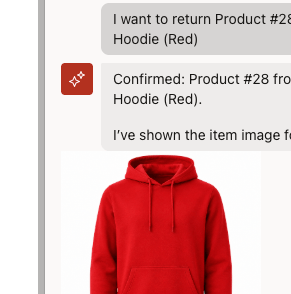
In my previous Blog we enhanced Oracle APEX’s AI Assistant with quick actions. Taking this further, we might want to add images , here’s an example of how to do that
We can achieve this using an AI Agent Tool with client‑side JavaScript to extract an image from the database via AJAX.
First, store your images as BLOBs in a table, such as PRODUCT_IMAGES (product_id, image_blob, mime_type). For a chatbot, the image only needs to be a small representation of the product rather than a large catalogue‑quality image. This has the advantage of allowing us to render the image using Base64 encoding, which is easy to handle and display for small files (<100MB).
Next, create an AJAX process to convert the BLOB into Base64 text and return it as JSON:
DECLARE l_blob BLOB; l_mime VARCHAR2(255);BEGIN SELECT image_blob, mime_type INTO l_blob, l_mime FROM product_images WHERE product_id = TO_NUMBER(apex_application.g_x01) AND ROWNUM = 1; apex_json.open_object; apex_json.write( 'image', 'data:' || l_mime || ';base64,' || apex_web_service.blob2clobbase64(l_blob) ); apex_json.close_object;EXCEPTION WHEN NO_DATA_FOUND THEN apex_json.open_object; apex_json.write('image', ''); apex_json.close_object;END;
Then call the process and insert the image before the APEX chatbot input (or wherever else you want it to appear)
function showProductImage(productId) { apex.server.process( "GET_PRODUCT_IMAGE", { x01: productId }, { dataType: "json" } ).done(function (data) { $(".dynamic-product-image").remove(); if (!data.image) { return; } const html = ` <div class="dynamic-product-image"> <img src="${data.image}" alt="Product image" style="max-width:200px; height:auto;"> </div> `; $(".a-ChatInputContainer").before(html); });}
Finally, define an AI Tool to call the function as needed, for example, replacing the parameter dynamically as needed.
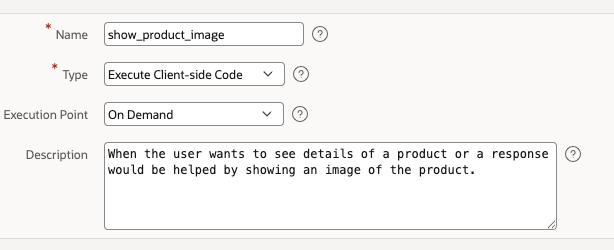
showProductImage(123);
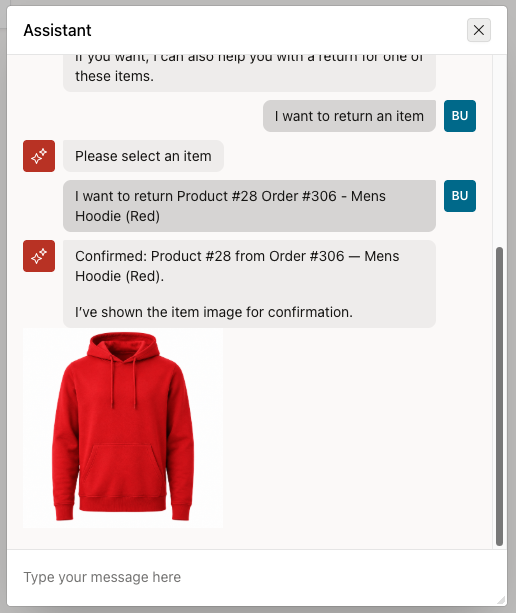
The end result is the AI Assistant automatically offering to show the image.
Conclusion
Adding images to the APEX AI Assistant is straightforward. Simply store small images as BLOBs, expose them through a lightweight Base64‑returning AJAX process, and render them dynamically in the chat UI. It’s a simple, fast approach for compact interfaces, while larger or high‑volume image needs are better served by a dedicated image endpoint.


Leave a Reply